


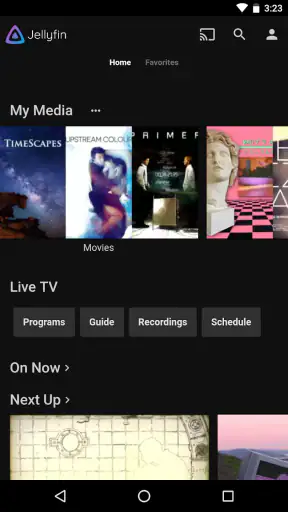
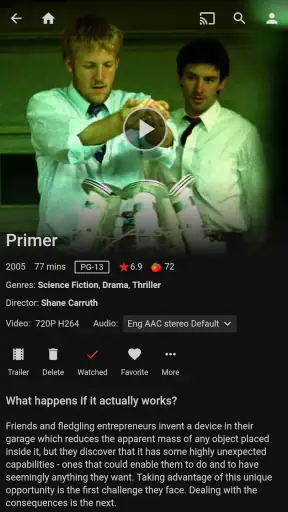

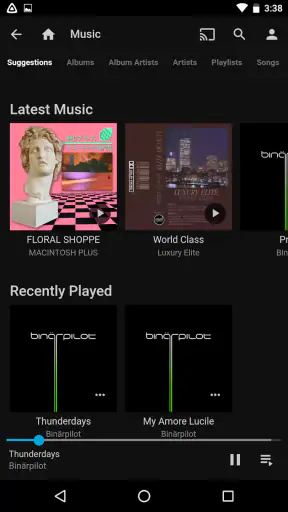


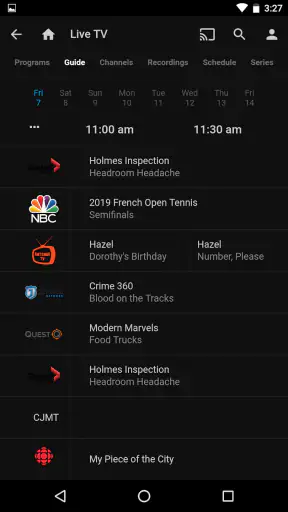

I approached Jellyfin as someone looking for a cleaner way to watch personal media on a phone, rather than as another service filled with content I do not own. That distinction matters. This is a free video player and media app from the Jellyfin developer, built around the idea that your library should remain under your control. It is available for everyone, runs on Android devices using Android 5.0 or later, and has grown to over one million installs. The current version is 2.7.1.
My first impression was that Jellyfin is less like a traditional streaming subscription and more like a window into a media library you manage yourself. If you already have a Jellyfin server with films, television episodes, music videos, or other compatible media, the mobile app can become a convenient front end for browsing and playback. If you install it without any server or library ready, however, the opening experience can feel more technical than the word “player” suggests.
Getting from installation to your first successful watch
What to expect before installing
The most important thing to understand is that the app does not replace the work of organizing or hosting your media. Its value depends heavily on the rest of your Jellyfin setup. I would not recommend downloading it with the expectation that it will immediately behave like a conventional catalog service. There is no promise of an instant collection waiting for you; the meaningful experience begins when the app can connect to a Jellyfin server containing your own library.
That makes it especially appealing for people who have accumulated video files across a computer, home server, or network storage and want a more comfortable way to browse them. Instead of opening folders and guessing which file is which, you can use the Jellyfin interface as the viewing side of a more organized personal system. For a family, that can be easier than passing files around. For an individual, it can turn a scattered archive into something that feels closer to a private streaming library.
I also like the privacy-minded direction. The phrase “your media, on your terms” fits the experience better than a generic promise about endless entertainment. You decide what belongs in the library and how the server is managed. That control is a real strength, but it also means you are accepting more responsibility than you would with a fully hosted alternative.
The app has an average rating of 4.0 from around 6,900 ratings, with roughly 629 written reviews. I read that overall response as a sign of a product people find useful when it matches their setup, while also recognizing that a self-managed media system can create more points of friction than a one-tap streaming app. The rating is respectable, but it is not a reason to expect a completely effortless experience on every device or network.
Preparing the first connection
For a first-time user, the smoothest path is to prepare the server before spending much time inside the mobile app. Make sure the server is running, that at least one library has been created, and that the media you want to test is visible there. A short test library is better than importing everything at once. I would start with one film or one television season so that you can identify connection or organization problems without searching through a large collection.
When the app asks for the server address, enter the address that is appropriate for the network you are using. On a home network, this usually means connecting to the local server address rather than trying to treat it like a public website. If you are away from home, the connection path depends on how your server has been made reachable. This is one of the places where Jellyfin differs from ordinary streaming apps: the app cannot solve an incorrectly configured network by itself.
My practical advice is to test locally first. Use the phone and server on the same network, sign in, and confirm that the library appears before attempting remote access. This simple order saves time because it separates two different problems. If the library is missing at home, the issue is probably related to the server, account, library scan, or address. If it works at home but not elsewhere, the next investigation belongs to remote connectivity rather than the app’s basic interface.
It is also worth checking the server account you intend to use. A restricted account may not show every library, and that can look like a failed scan when the real explanation is access control. I prefer creating a small, clearly named test library and checking it with the same account I use on the phone. That gives me a definite answer about whether the mobile login is working.
The first action that proves everything is working
The first meaningful success is not merely seeing the Jellyfin home screen. It is opening a known video, starting playback, and confirming that the picture and sound behave normally for several minutes. Choose a file you know well, preferably one that is easy to recognize and not part of a huge collection. Once it plays, try leaving the video and opening it again. That second visit tells you more about the everyday workflow than a successful login alone.
I find this test useful because it exposes the difference between browsing and actual playback. A library can appear correctly while a particular file still creates a compatibility or performance problem. If one video struggles, I would not immediately conclude that the entire app is unreliable. I would compare it with another file, check whether the issue follows a specific format or resolution, and consider whether the server is having to do more work than expected.
Another good early habit is to give your media sensible names before importing a large collection. Jellyfin can only present a polished library when it can identify what it is looking at. Clear folder structures and consistent filenames reduce the chance of missing artwork, incorrect episode grouping, or duplicate-looking entries. This is not glamorous advice, but it has a bigger effect on daily comfort than repeatedly changing playback settings.
For a realistic example, imagine that I want to watch a television episode on my phone while someone else uses the main television. I would first confirm that the episode is visible in the correct series, open it from the library rather than from a file browser, and start playback on the home network. If that works, I have achieved the core purpose: the same personal collection is available in a more flexible place without copying the episode to the phone first.
Where first-time users commonly get confused
The biggest misunderstanding is expecting Jellyfin to provide media on its own. The app is a client for a Jellyfin-based personal media setup, not a replacement for the server side. If you install it and see no useful content, that does not necessarily mean the application is broken. It may simply mean there is no connected library, the server address is wrong, the account lacks access, or the server has not finished organizing the files.
Another source of confusion is the difference between a video being listed and a video being ready for smooth playback. Depending on the file and the server, playback may require the media to be delivered in its original form or converted during the session. That conversion can place more demand on the server and the network. I would therefore avoid judging performance from a single difficult file, especially when a simpler test video plays normally.
Network language can also make the setup feel harder than it is. A local connection and a remote connection are not interchangeable experiences. At home, the phone may reach a private server address directly. Away from home, the server must be reachable through the arrangement you have configured. If you are not comfortable managing that side, Jellyfin may require more patience than a hosted service.
The interface can feel more functional than decorative. People coming from polished commercial streaming platforms may miss the instant recommendations, editorial collections, and highly guided onboarding those services provide. Jellyfin’s strength is giving you access to your own organized material, not deciding what you should watch next. I see that as an intentional trade-off, but it is still a trade-off.
Making the app comfortable for everyday use
Once playback works, I would resist the temptation to import the entire archive immediately. Add media in stages and check how the library is grouped. This makes it easier to catch naming problems early and prevents a first session from becoming an exercise in scrolling through thousands of uncertain entries.
I would also use the phone as a companion screen rather than assuming it must be the main playback device. It is useful for checking a library, starting a film in another room, or watching privately with headphones. That flexibility is one of the reasons a dedicated client can be more convenient than manually opening files from storage. The app’s role becomes clearer when it removes small daily obstacles instead of trying to imitate every feature of a commercial platform.
For households, account separation deserves attention. If several people use the same server, individual accounts can make the library feel less chaotic and help keep personal viewing activity separate. The exact experience depends on how the server administrator has configured access, but thinking about accounts early is better than trying to untangle everyone’s preferences after the library has grown.
For travel, I would test the intended routine before leaving home. Do not wait until you are on a different network to discover that the server cannot be reached. Open the app while connected locally, then test the remote path in a controlled situation if you plan to use it. This is a practical weakness compared with services designed around instant access: Jellyfin gives you control, but control requires preparation.
How it compares with familiar alternatives
Compared with subscription streaming apps, Jellyfin is better suited to people who already own or manage their media. It avoids the frustration of watching a favorite title disappear from a commercial catalog, and it does not force your viewing choices into someone else’s content library. The downside is that you supply the collection, maintain the server, and deal with connection issues yourself.
Compared with opening files directly in a basic mobile video player, Jellyfin offers a more library-centered experience. A folder-based player may be faster for playing one local file, especially when no server is involved, but it does not provide the same sense of a shared personal catalog. Jellyfin becomes more useful as the number of videos grows or when the files need to be accessed from more than one device.
Compared with other self-hosted media clients, the key question is not simply which interface looks nicest. The real question is whether you want a system that keeps the server and library under your control. If you want the least maintenance possible, a hosted alternative is probably the better fit. If you want ownership and are willing to troubleshoot the occasional connection or organization problem, Jellyfin has a more convincing reason to exist.
Who should use it, and who should skip it
I would recommend Jellyfin to someone with a personal video collection, a willingness to manage a server, and a desire to watch that collection from a phone without manually transferring every file. It also makes sense for households that want one organized library available across several viewing situations, provided the person managing the setup is comfortable handling accounts, media organization, and network access.
I would skip it if I only want to open a local video immediately, have no interest in running or accessing a Jellyfin server, or expect a service that supplies recommendations and ready-made content. In those cases, a straightforward local player or a conventional streaming app will probably feel more natural. Jellyfin is not automatically better; it is better for a particular kind of ownership and workflow.
The free price is a major advantage for trying that workflow without adding another subscription. Its Everyone content rating also makes it broadly approachable from an age-classification standpoint, although the actual material visible in a library depends on what the server administrator adds. That distinction is important for families: the app’s rating does not automatically make every item in a personal library suitable for every viewer.
My next-step advice after the first successful playback
After confirming that one video plays, I would build a repeatable routine: keep the library structure tidy, test new media with a small sample, and verify local access before experimenting with remote viewing. If something fails, change one variable at a time. Try another file, another network, or another account rather than changing everything at once. That approach makes Jellyfin’s occasional technical friction much easier to understand.
I would also decide what role the mobile app should play in my life. For me, its strongest use is convenient access to a personal collection when I do not want to sit at the main screen or deal with raw folders. It is less compelling as a standalone discovery tool. Once that expectation is set correctly, the app feels focused rather than limited.
Jellyfin has been available since June 10, 2019, and the current Android release is 2.7.1. Those details matter less than the basic fit: this is a mature idea centered on self-managed media, not a magic shortcut around media organization. I appreciate that honesty in the product concept, even when the setup asks more from me than a commercial streaming app would.
My final view is positive, with a clear condition. Jellyfin is a strong free choice for anyone who wants a personal media library on their own terms and is prepared to handle the server behind the app. The first connection may require patience, and remote access or difficult files can demand extra troubleshooting. But once the library is organized and the first reliable playback is complete, the app becomes genuinely useful. If you want control more than convenience, Jellyfin is worth the setup effort.


